
Tap to Go
Field guide · keep this open on your phone Taking a Payment [EVENT NAME] [PRODUCT N...
Let me ask you something — how many customers have you lost because your login process was a pain?
Here's the thing most store owners miss: customer accounts aren't just a "nice to have" setting buried in your Shopify dashboard. They're the foundation of repeat business, self-serve returns, store credit, and the kind of seamless shopping experience that turns one-time buyers into loyal fans.
And the good news? Shopify has made this ridiculously simple — if you know which settings to activate and why they matter. That's exactly what I'm walking you through today.
Whether you're running a B2B operation or a direct-to-consumer store, this guide covers everything: the recommended passwordless login (yes, no more forgotten passwords!), social sign-in with Google and Facebook, self-serve returns, and store credit visibility. Let's get your customer accounts set up properly — once, the right way.
📖 Want the complete Shopify setup system? My book Shopify Made Easy walks you through every setting, every optimization, and every shortcut I've learned coaching entrepreneurs to 7-figure stores. Grab your copy here →
From your Shopify Dashboard, head to Settings → Customer accounts. This is your command center for everything related to how customers create accounts, log in, and manage their orders.
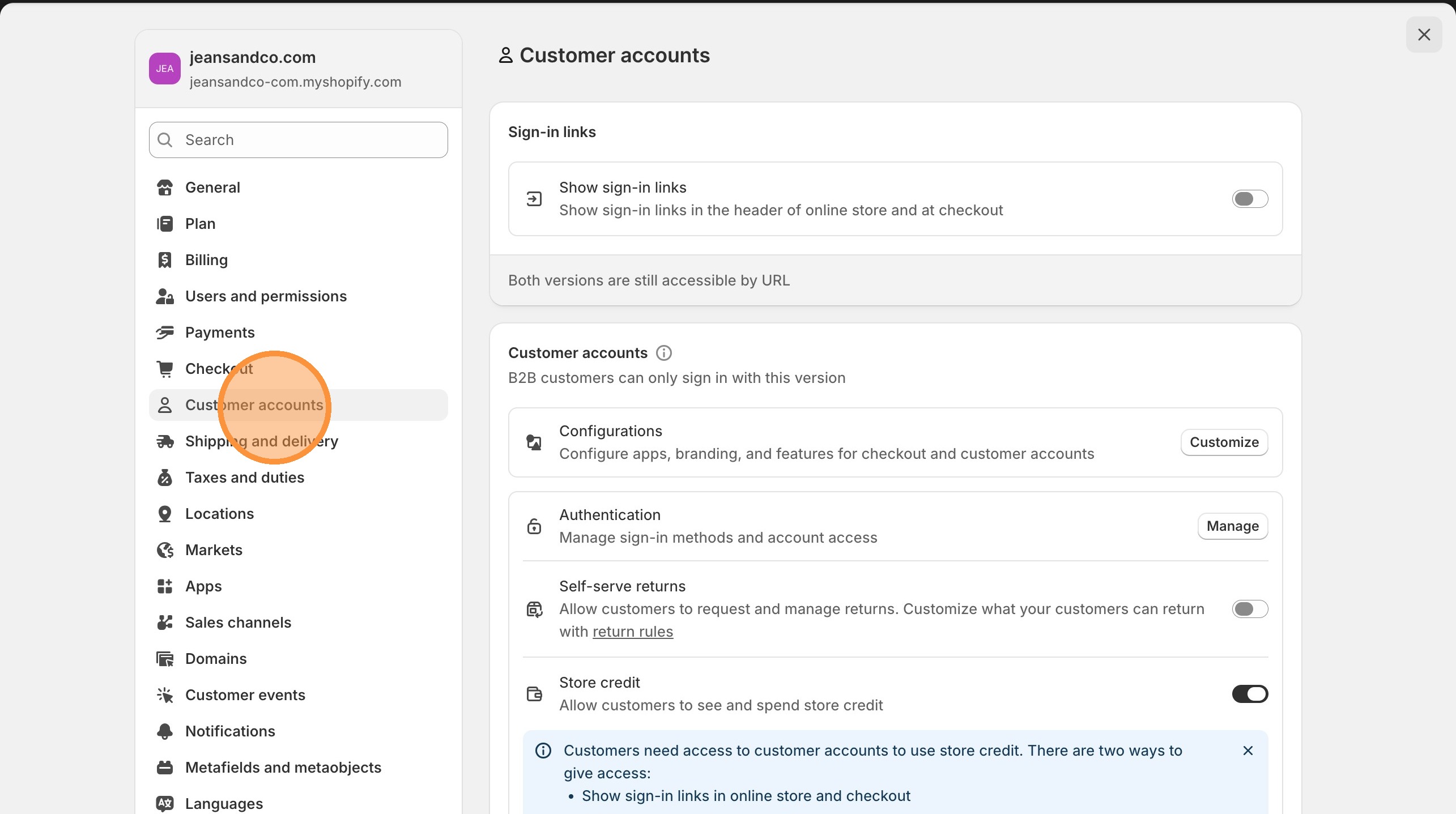
The first setting you'll see is Sign-in links. When you activate this, sign-in links will appear in the header of your online store and at checkout. This is non-negotiable — your customers need to see where to log in without hunting for it.
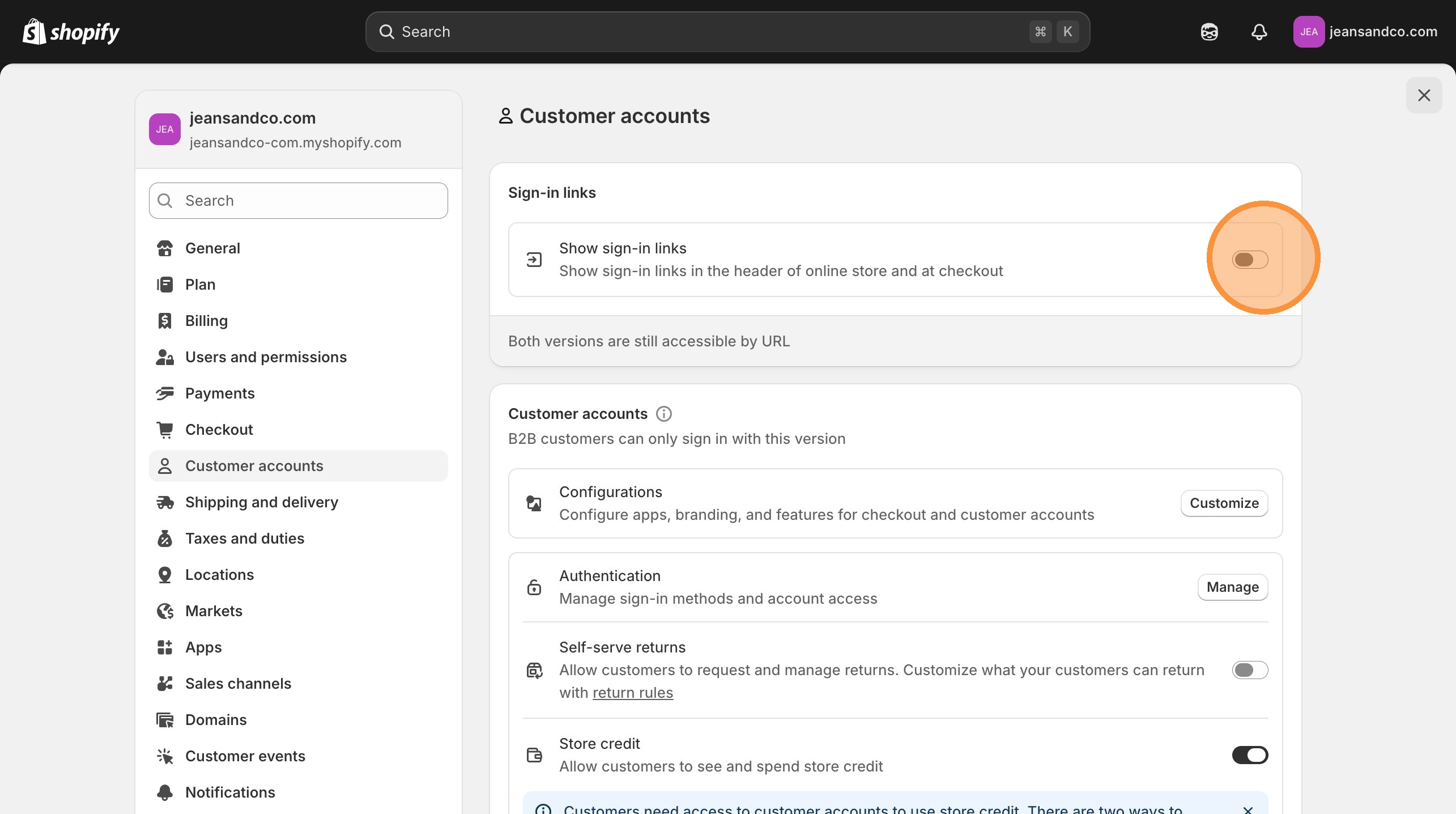
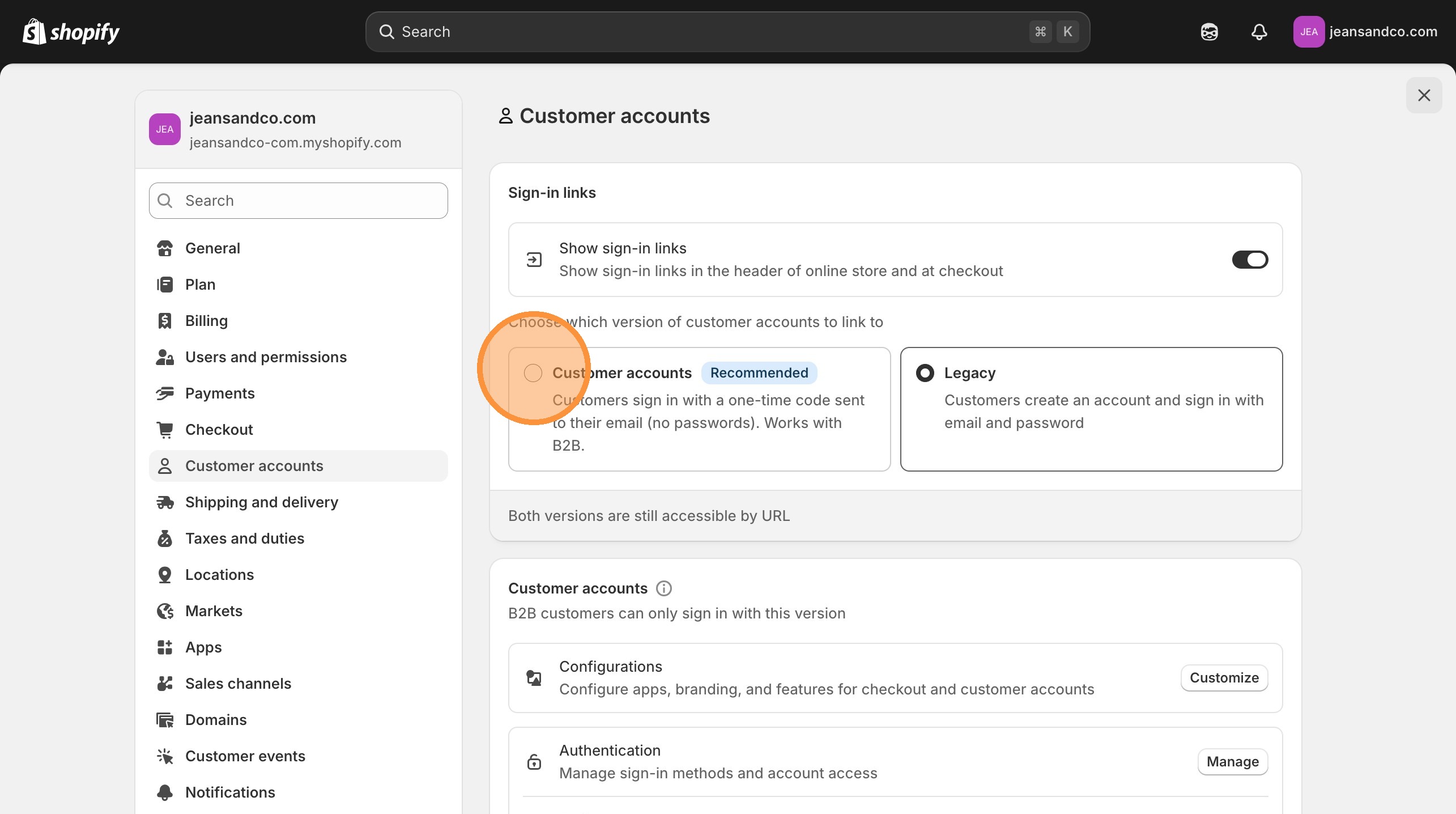
Now you have two choices, and this decision impacts your entire customer experience:
Option 1: "Customer accounts" (RECOMMENDED) — Customers sign in with a one-time code sent to their email. No passwords to remember, no reset emails, no friction. This also works with B2B.
Option 2: "Legacy" — The old-school method where customers create an account with email and password.
My recommendation? Go with "Customer accounts" every time. Shopify recommends it too, and here's why: every forgotten password is a potential lost sale. The one-time code method eliminates that friction completely. Your customers open their email, click a code, and they're in. Simple.
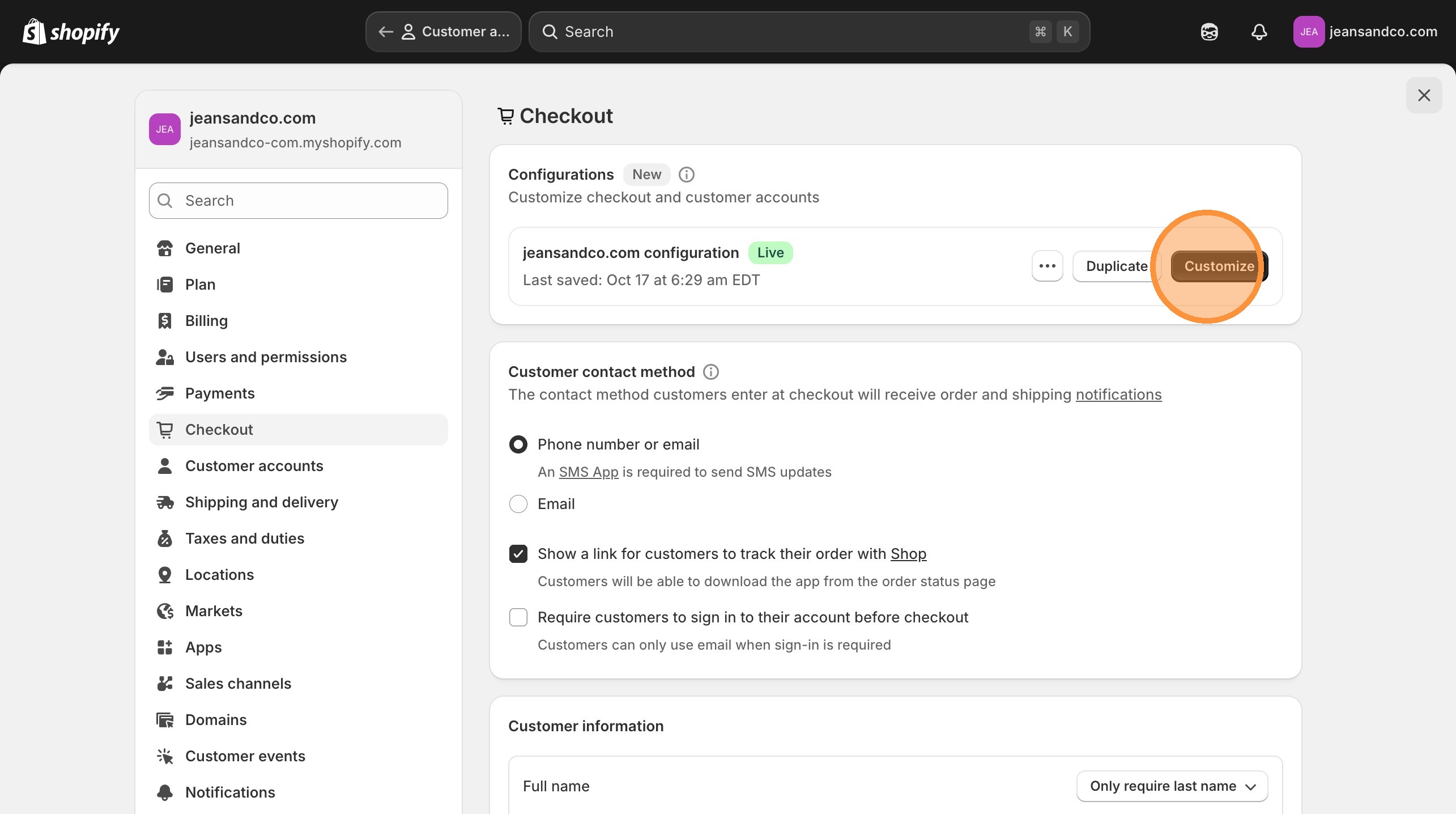
In the Configurations section, click the "Customize" button. This takes you to the settings that configure apps, branding, and features for both checkout and customer accounts. Think of this as the bridge between your account settings and how they actually look and feel to your customers.
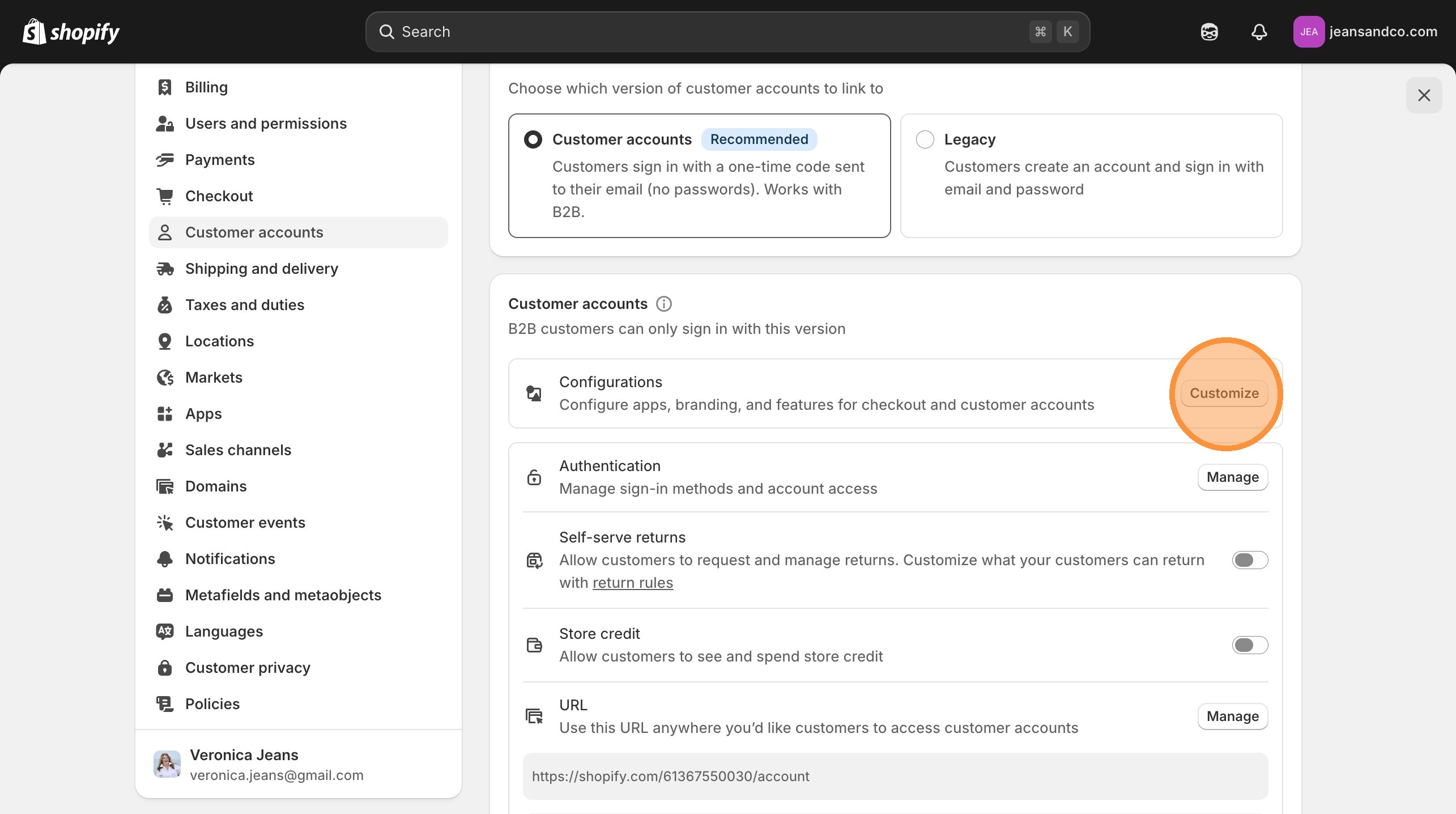
You'll land on the Checkout setting page. Click "Customize" again to open the checkout page in the Theme Editor. This is where you can visually design how your checkout and customer account experience looks — matching it to your brand is essential for building trust.
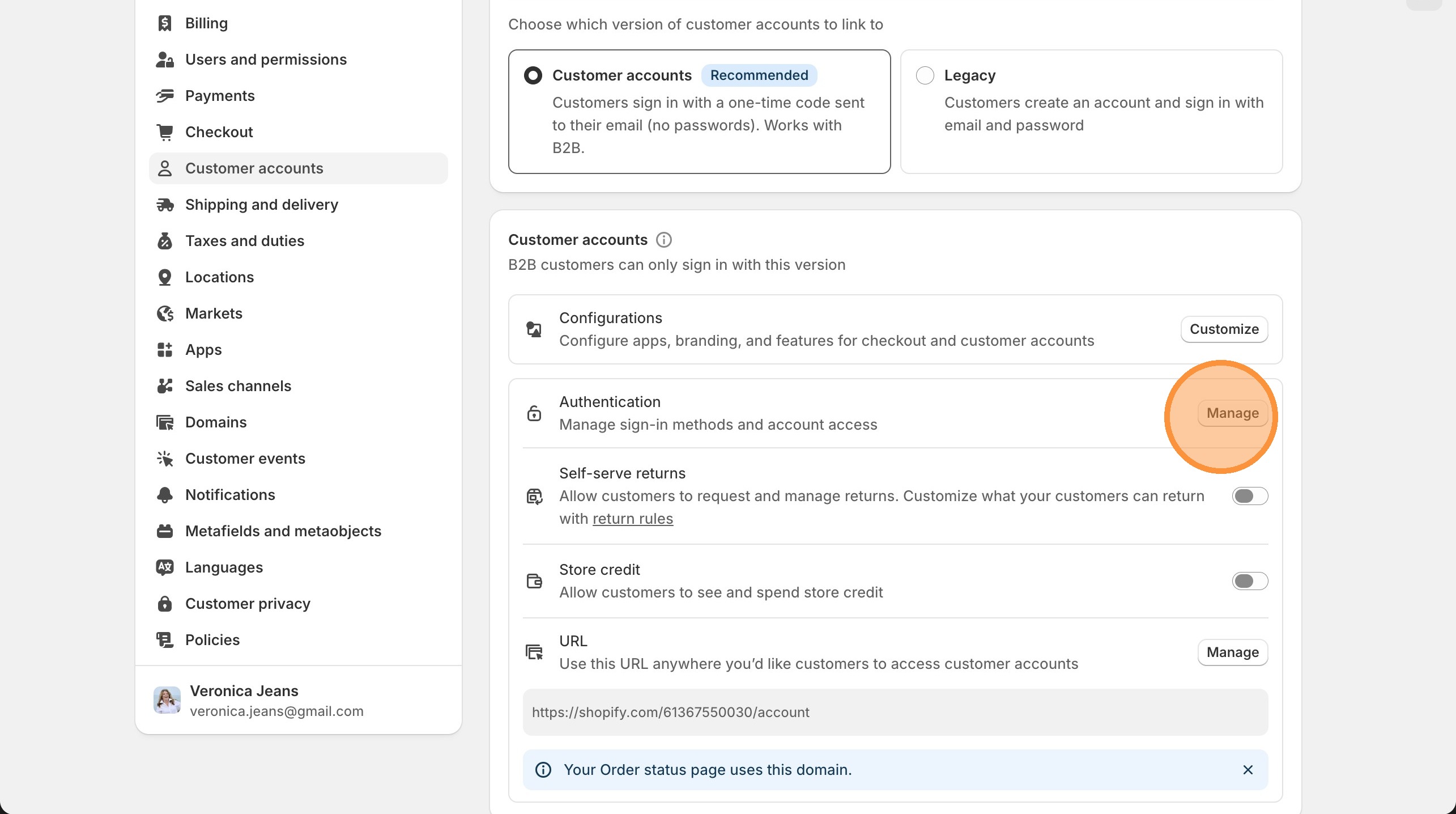
Here's where it gets interesting. In the Authentication section, you can manage sign-in methods and account access. Click "Manage" to see all the ways you can allow your customers to log in.
If your goal is to make signing in as frictionless as possible (and it should be), this is where you enable social sign-in options like Google and Facebook.
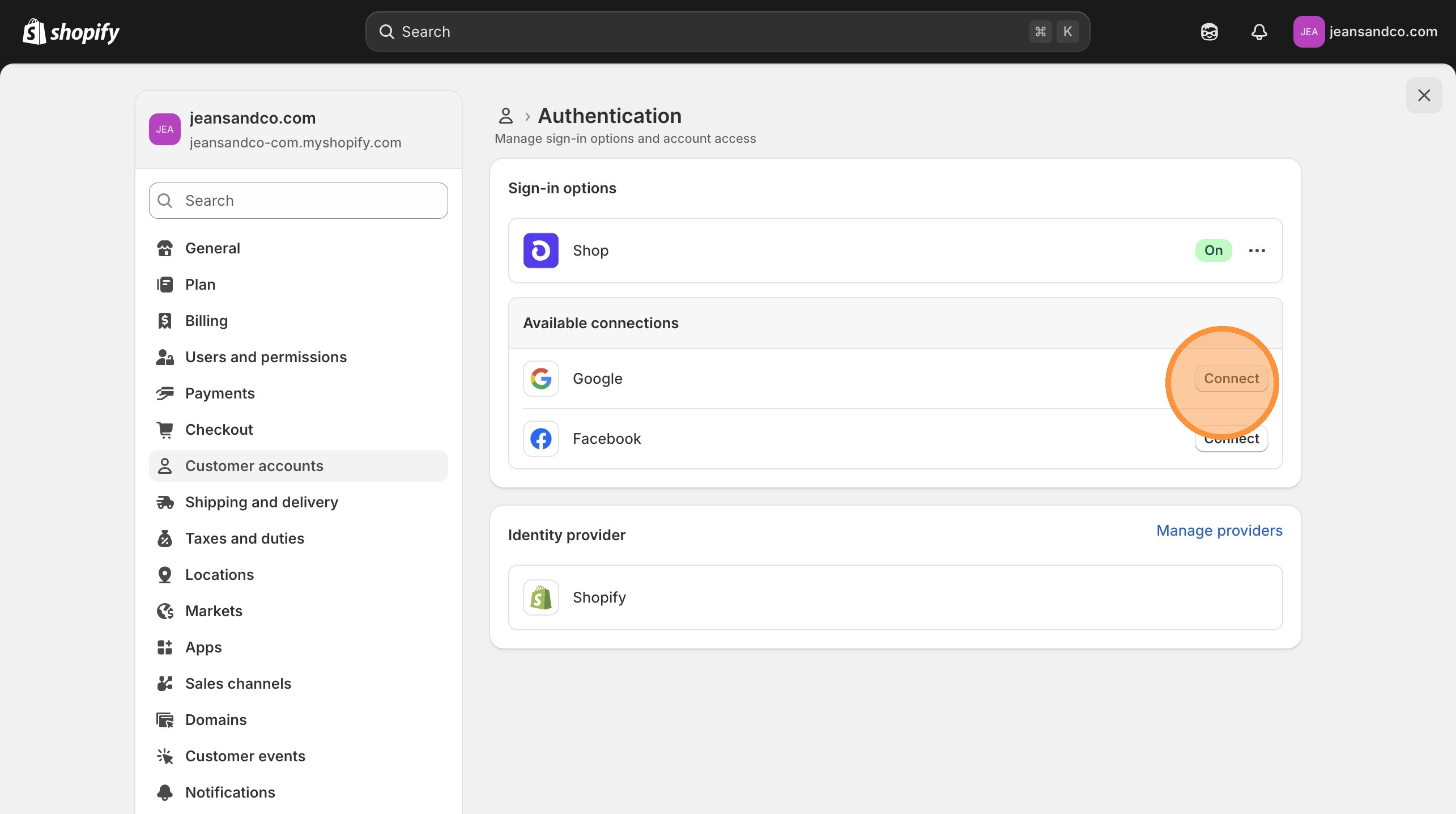
You have four authentication methods available:
Click "Connect" next to Google and Facebook to configure these. Here's my take: enable both. Your customers already have these accounts, and every extra step you remove from the login process is another barrier eliminated between them and their purchase.
💡 Pro Tip from my consulting work: Stores that enable social login see higher account creation rates because customers don't have to create yet another password. I cover the complete checkout optimization strategy in Shopify Made Easy — including the settings most store owners never touch.
This is the part that separates professional stores from amateur ones. In the customer account settings, you can:
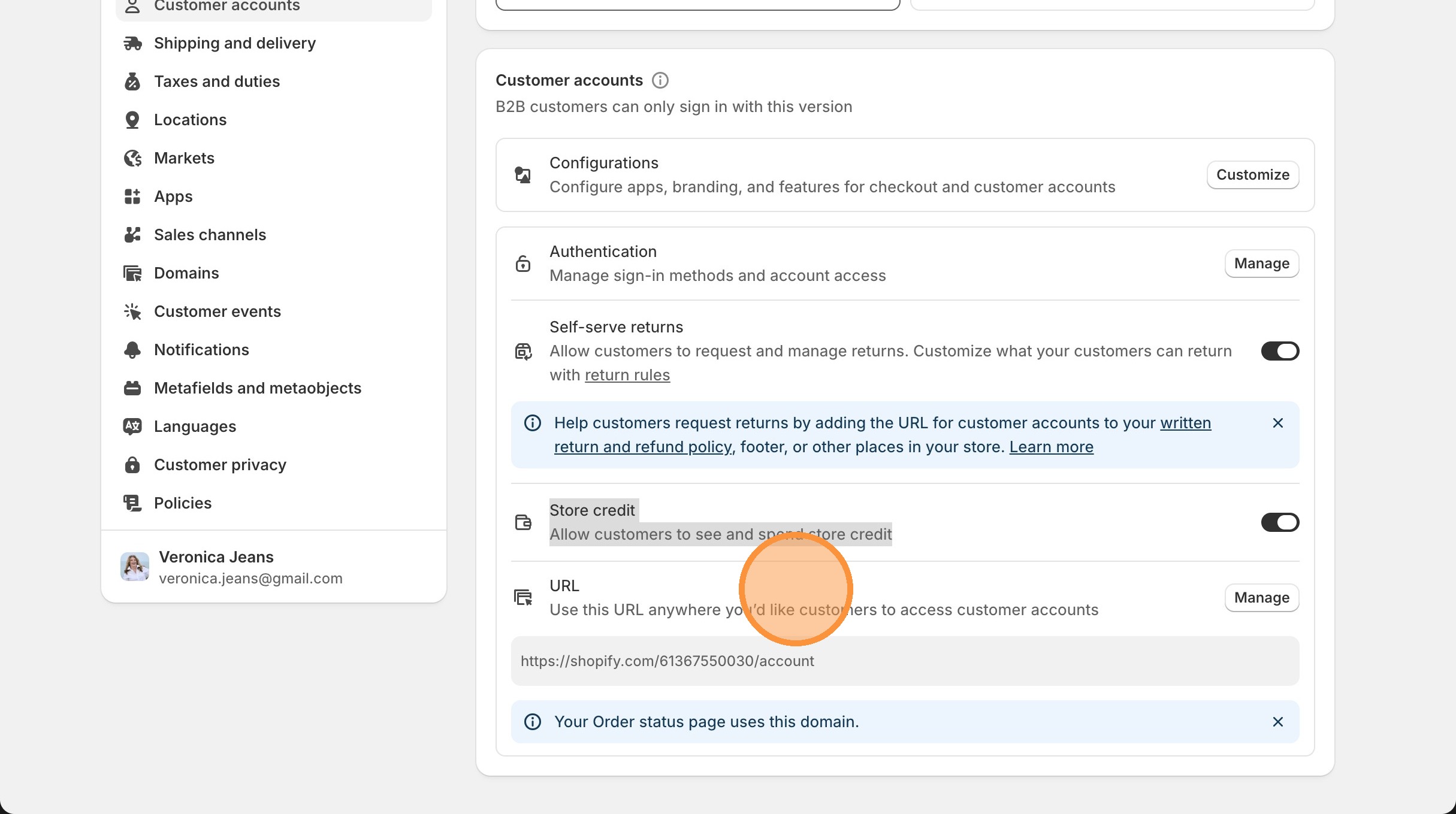
Enable Self-Serve Returns — Allow customers to request and manage returns directly from their account. No more back-and-forth emails. Customize what your customers can return using your return rules, and make sure to add your customer accounts URL to your written return and refund policy, your footer, and anywhere else customers might look for return information.
Enable Store Credit Visibility — Allow customers to see and spend their store credit balance. This is a powerful retention tool — when customers know they have credit waiting, they come back.
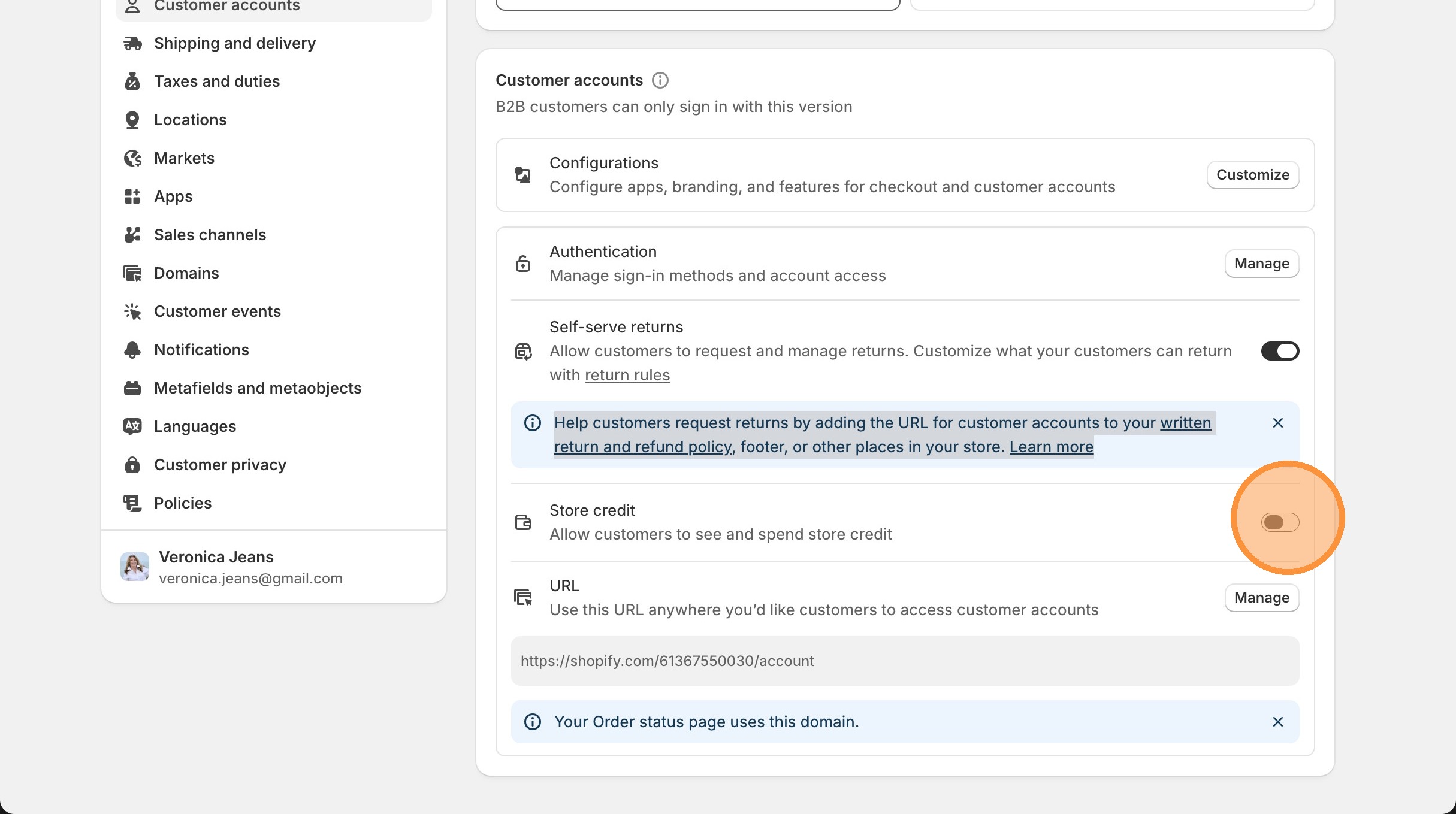
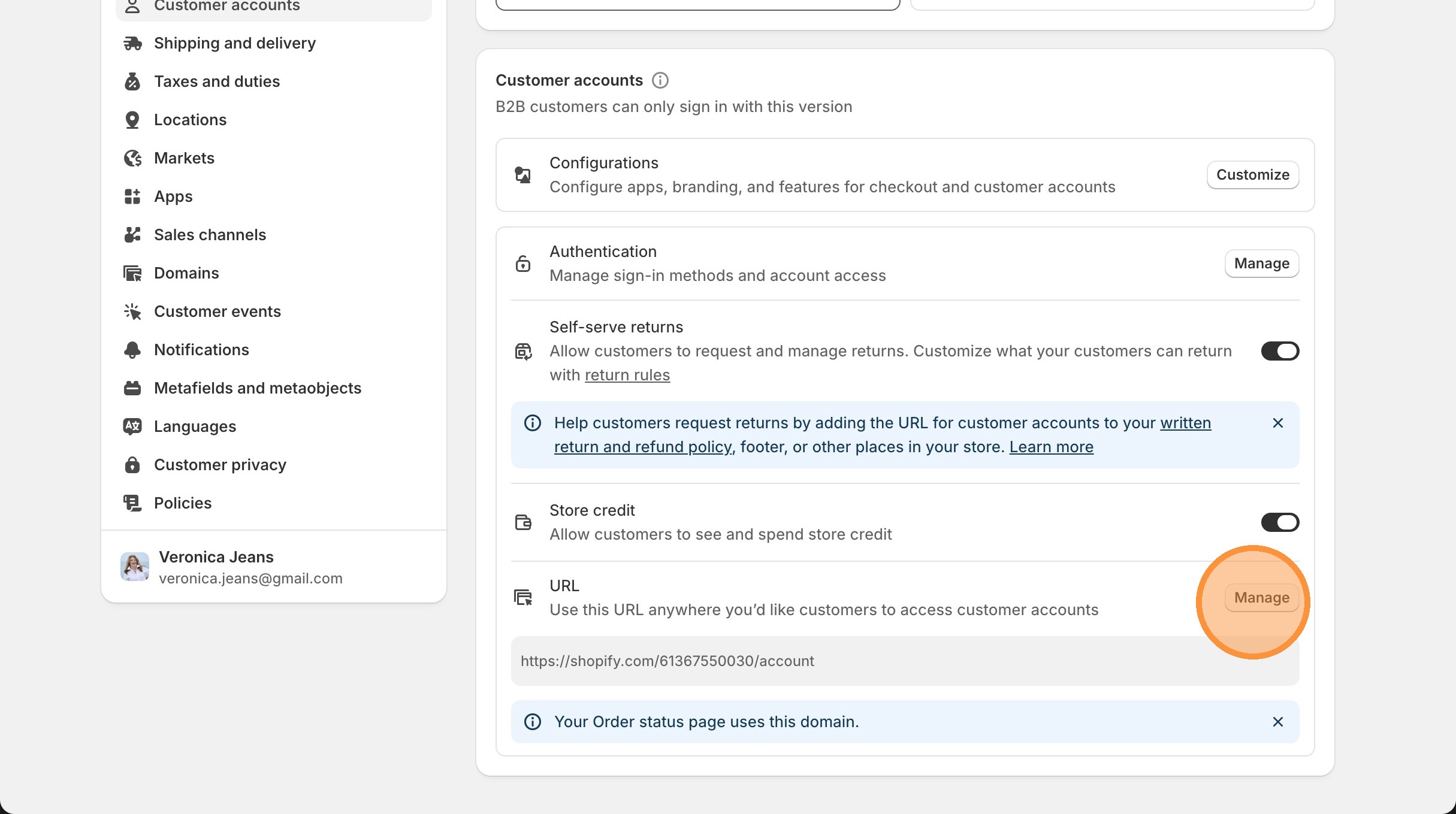
Shopify provides a dedicated URL for customer accounts. Use this URL anywhere you want customers to access their accounts — your order status page already uses this domain automatically.
Add this link to your navigation menu, your footer, your order confirmation emails, and your return policy page. The more places customers can find their account, the less support tickets you'll receive.
Click "Manage" to create a sub-domain with your host provider for your customer accounts. This means instead of a generic Shopify URL, your customers see something like accounts.yourstore.com — which looks professional and builds brand trust.
Let me connect the dots here. Customer accounts aren't just about convenience — they're about building a business that generates repeat revenue without you working harder:
Repeat purchases: Customers with accounts have their shipping info saved, their order history visible, and store credit waiting. That's three reasons to come back without you sending a single email.
Reduced support costs: Self-serve returns mean fewer "where's my refund?" emails clogging your inbox. Your customers handle it themselves, and you approve or deny from your dashboard.
Better marketing data: Account holders give you richer customer data for segmentation. You know what they've bought, when they bought it, and what they browse — which means your email marketing gets smarter.
B2B ready: If you're thinking about wholesale or B2B sales, the new customer accounts system supports it natively. One setup, both channels covered.
Setting up customer accounts is one piece of the puzzle. Here are some related guides to help you build a store that actually works for you:
"Customer accounts" uses a modern passwordless login — customers receive a one-time code via email to sign in. No passwords to remember or reset. "Legacy" is the traditional email-and-password method. Shopify recommends the newer "Customer accounts" option because it reduces friction and supports B2B functionality. Most stores see better account creation rates with the passwordless option.
Yes. In your customer account settings, go to the Authentication section and click "Manage." You'll see options to connect Google and Facebook as sign-in methods alongside Shopify's default login and Shop. Click "Connect" for each platform to configure them. Enabling social login reduces signup friction because customers can use accounts they already have.
Enable self-serve returns in your customer account settings. This allows customers to request and manage returns directly from their account page. You'll want to customize your return rules in Settings → Legal, and add your customer accounts URL to your written return policy, store footer, and order confirmation emails so customers can easily find the self-serve option.
Yes, setting up a custom sub-domain (like accounts.yourstore.com) for customer accounts is recommended. It looks more professional than a generic Shopify URL, builds brand trust, and gives customers confidence they're interacting with your store. You can set this up through the "Manage" option in your customer accounts settings, which connects to your domain host provider.
Yes. The modern "Customer accounts" option (not Legacy) natively supports B2B functionality. This means you can manage both direct-to-consumer and wholesale customers through the same account system. B2B customers get access to company-specific pricing, payment terms, and order management — all through the same customer account infrastructure.
When you enable the store credit setting in customer accounts, customers can see their available credit balance and spend it at checkout. Store credit is a powerful retention tool — customers who know they have credit waiting are more likely to return and make another purchase. Enable this in your customer account settings under the store credit section.
Add your customer accounts URL in multiple locations: your store header navigation, footer menu, order confirmation emails, return policy page, and the order status page (which uses it automatically). The more accessible your account login is, the fewer support tickets you'll receive about order tracking, returns, and account access.
Customer accounts are just one piece of a properly optimized Shopify store. My book Shopify Made Easy gives you the complete system — from setup to scaling — based on everything I've learned coaching entrepreneurs to 7-figure businesses and teaching eCommerce at university level.
Available in paperback, eBook, and digital download